
Audi is the opposite problem from most brands. Here the button count barely varies — nearly every cover in the collection is sold as a three-button cover — so the number that helps you elsewhere tells you almost nothing. What separates one Audi key from another is where those three buttons sit and whether the key carries a folding blade. Two keys can both say “3-button” and still need different covers, which is why the photo matters more here than the count.
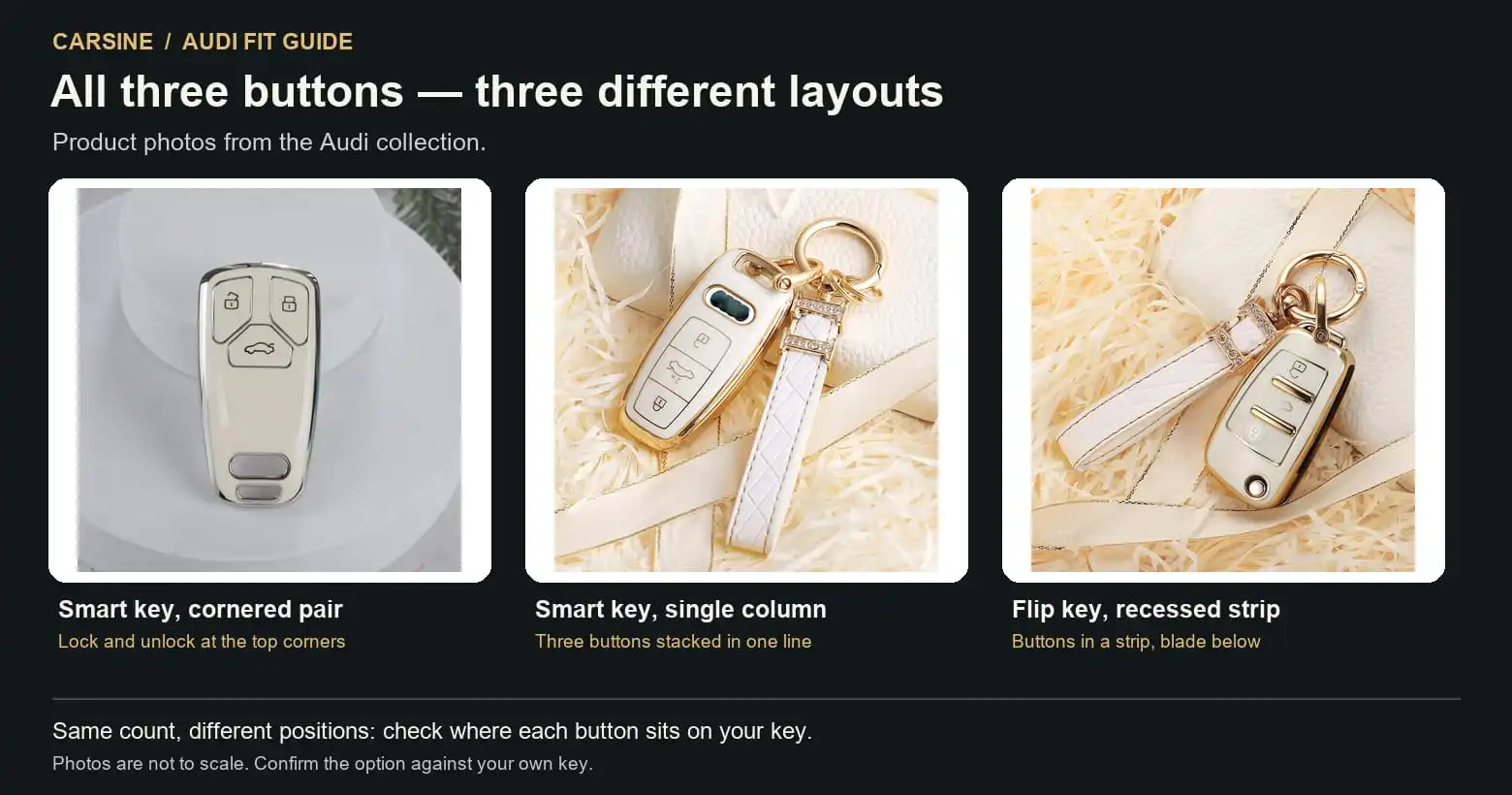
Three buttons, so count won’t decide it
Look through the Audi covers in this store and the titles repeat the same phrase: three-button. A gold-edge smart key cover, a silver-edge smart key cover, a leather version, and a flip-key cover all describe three buttons. If counting were enough, any of them would do.
They aren’t interchangeable. Once you set the count aside, two questions decide the rest: does your key have a folding blade, and how are the three buttons arranged on the face? Answer both from your own key and the shortlist collapses quickly. Skip them and you’ll be choosing by colour, which is the one variable that has nothing to do with fit.
The reason is structural. Audi reused a three-button remote across many models while changing the shell around it: the same three functions appear in different positions, and some keys carry a folding blade while others are sealed. A cover is moulded to one of those shells, not to a button total, so the count narrows nothing on its own.
First fork: folding blade or sealed smart key
Fold the blade out, or check for the seam and hinge where one would sit. A flip key has a metal blade that swings from the shell and a release control to free it; a smart key is a sealed fob with no blade on show. The Audi collection splits along exactly that line: flip-key covers are listed for A3, A1, Q3, and TT-style keys, while smart-key covers are listed for A4, A5, A6, Q5, and Q7-style keys.
This is the check to make first, because it changes the shape of the cover rather than just its markings. A flip-key cover has to leave the blade path and release clear, while a smart-key cover wraps a closed body. In the image above, the right-hand key is the flip type: the buttons sit in a recessed strip and the blade housing occupies the lower end. The two smart keys beside it have no such housing, and their lower ends are plain shell.
Where the three buttons sit
With the blade settled, look at the arrangement. Audi’s three buttons appear in at least two distinct patterns within this collection, and they are easy to tell apart once you know what to compare.
In the cornered layout, lock and unlock sit at the top corners with a car button centred beneath them, forming a triangle. In the stacked layout, all three run down a single column — lock, car, unlock — with no side-by-side pair at the top. A cover moulded for the cornered layout has pads at the top corners; a cover moulded for the stacked layout has one continuous strip. Put the wrong one on and the pads land between your buttons rather than over them.
The practical test takes a few seconds: hold your key face up and ask whether the top two buttons sit side by side. If they do, you’re looking at the cornered layout. If every button has its own row, you’re in the stacked group.
Details that look like buttons but aren’t
Audi keys carry features that read as controls in a photograph. A small dark window near the top of the shell is usually an indicator, not a button, and some covers leave it exposed while others cover it. At the base of the silver-edge key above, two rounded metal-looking bars sit below the button panel; they are part of the shell rather than controls you press.
Don’t count these when you compare. Count only the three pads that correspond to lock, unlock, and the car or trunk function, then check that the cover’s moulded markings match those three in position. If a listing photo shows four or five “buttons”, look again: some of what you’re seeing is trim, and comparing against an inflated count is how people end up ordering the wrong option.
| What to compare | What a match looks like | When to rule the option out |
|---|---|---|
| Blade | Folding blade with a hinge, or a sealed smart-key body | A flip-key cover matched to a smart key |
| Top pair | Lock and unlock side by side, or each on its own row | Corner pads on a key with a single column |
| Third button | Car or trunk pad centred below, or third in the column | The pad sits between your buttons rather than over them |
| Trim | Indicator window and base bars treated as shell, not buttons | A count that includes decorative elements |
Where the model code helps
Model codes are the most useful part of an Audi listing, and the least decisive. Codes like B8, B9, or 4M point to a generation, and a listing that names A4 B9 or Q7 4M is telling you which era of key it was built around. That’s genuinely useful for narrowing the collection to a handful of candidates.
It stops there. A generation label can’t tell you whether your particular key has the cornered or stacked layout, and it can’t tell you whether you’re holding a flip key or a smart key, because both existed within the same model names across different years and trims. Read the code, shortlist the options, then confirm against the photo of the option itself. We use the same sequence for GM keys and for Jeep, Dodge, Chrysler and Ram; the brand changes, the method doesn’t.
When the photo isn’t clear enough
Audi listings are often styled with props — ribbon, leather, straw — and the key sits at an angle. That’s fine for judging the finish and harder for judging the top pair of buttons. If you can’t tell whether the two top pads sit side by side, look for a second image in the gallery that shows the cover straight on, or check the option-specific reference photo rather than the lead image.
If neither settles it, ask the seller to confirm the option, and send one clear straight-on photo of your own key with the option name you’re considering. A question phrased around the layout — “is this the version with lock and unlock side by side at the top?” — gets a checkable answer. A yes-or-no question about your car doesn’t.
Two other things worth asking while you have their attention: whether the cover leaves the indicator window visible, and whether the base trim on your key is covered or exposed. Neither affects fit, but both affect whether the cover looks like it belongs on that key, and you can’t judge either from an angled lifestyle photo.
Confirm the option you selected, then order
Most Audi covers here are sold in several finishes on one page: gold edge, silver edge, leather, jade inlay. Set the fit option first, then look at what the gallery shows for that selection, because switching finish can change the photo you’re looking at. Re-check the top pair and the third button after you pick a finish.
Two last checks are worth the extra minute. Confirm the option label still names the shell you matched rather than a neighbouring fit that shares the gallery, and note the option name in your order confirmation so a mismatch can be described precisely if one arrives.
One thing that does not need checking: whether the cover says “Audi” on it. Branding doesn’t indicate which key a cover was moulded for, and the shell shape tells you far more than the badge does.
Ready to compare? Browse the Audi collection with your key in hand, and start with the blade and the top pair rather than the button count.


